Supported Devices
Iridium Certus Intellian
Device Summary
Intellian Iridium Certus terminals provide pole-to-pole connectivity over the Iridium network of 66 LEO satellites. The C700 delivers uplink speeds up to 352 Kbps and downlink up to 704 Kbps with three simultaneous voice lines, while the C200M and C200L offer global voice and data up to 176 Kbps. A C700 winterized version is Iridium-certified for an operational range of -50°C to +55°C (-58°F to 122°F).
Enabling Tracking
Configure Intellian Certus Terminal With Tracking
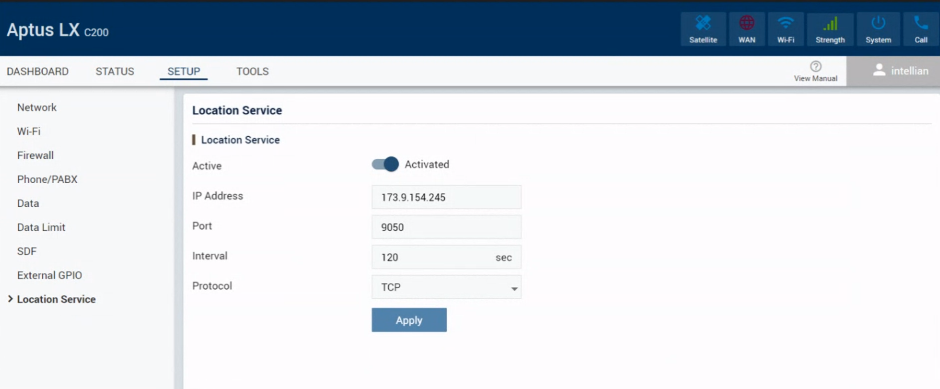
Setup Instructions
Connect a computer or mobile phone to the terminal via WiFi or Ethernet
Using a web interface go to http://192.168.200.1 or https://portal.aptuslx.local
Login to the web interface. For reference, the default username and password is:
- Username: intellian
- Password: 12345678
Go to “Setup” and select “Location Service”
Enter the IP Address “protocolparser.com”
Enter the Port “4838”
Select TCP or UDP. TCP is a higher reliability protocol but uses slightly more airtime
Choose an interval in seconds that suits your needs
Click “Apply”
Key Features
- True global coverage — Iridium LEO network of 66 satellites for low-latency, always-on pole-to-pole coverage.
- VSAT companion — L-band element of a hybrid network with out-of-band management and an API for 3rd-party Smart Box integration; 19" rack-mount BDU available for C700 and C200M.
- All-in-one solution — Built-in ATA, PoE, PABX, router, firewall, Wi-Fi, and WAN for least-cost routing via 3G/4G/5G.
- Cyber security — Built-in firewall, HTTPS/TLS certificate, and data encryption.
- Advanced voice — 3 HD voice lines, up to 4 directly connected SIP phones, up to 2 analog telephones, and soft PABX for up to 16 SIP phones.
Use Cases
- Maritime — C200M, C700, and C700 Winterized terminals cover varying vessel sizes and communication needs.
- Land — C200L Iridium Certus Land Fixed terminal supports business continuity, out-of-band management, remote connectivity, and disaster response.
See Also
Supporting Features
- Assets